Tag Archives: what I do

My Career Strengths

What are some qualities about myself that are important/useful in my working life?

I thrive on interacting with people, especially from a wide range of cultures. NB: I speak fluent Italian (I can understand a lot of Spanish and French as well), used to be fluent in Hindi. I have spent significant portions of my life in Italy and India. Love to travel, anywhere and everywhere.

I think in terms of cultures, and am good at interpreting different cultures to each other (this applies to corporate / workgroup cultures as well as national ones).

I believe that everyone has an interesting story, and I love to help them tell it. This genuine interest in people makes me a great customer advocate. Having listened carefully, I bring their concerns and needs back to those who can act on them.

I connect people to each other. When someone tells me about a problem or challenge they are dealing with, or a skill or asset they have, I think: “What can I do, who do I know, to help this person achieve their goal?” Or: “How can this skill / asset be applied to a problem I’m aware of?” If I don’t have an immediate answer, I soon start noticing new things / people that could fit. Finding such solutions, e.g. putting the right bunch of people together to tackle a problem, thrills me. It feels like amazing luck sometimes, but it’s really about knowing many people, and being awake to the possibilities that each represents.

I’m constantly thinking about how things could be made better: products, processes, communications, organizations. I find new ways to solve problems.

I embrace and enjoy change.

I’m self-winding: I don’t have a problem with taking direction, but I go along fine without it; I will always think of something to do that’s useful and to the point.

I get along well with geeks. (I am one!)

What tasks have I enjoyed most in my various jobs?

Communicating. This has taken various forms: technical writing, web content, web applications, training, video. I constantly try new tools and methods to see how they answer different communications problems. Social media is simply another set of tools, and I’m an active user. On Twitter I’m @deirdres.

Translating. Not so much translating from one language to another, as translating from one culture or mind-set to another, e.g. helping explain user requirements to engineers, and helping engineers design or document their work so that users can better understand it.

Designing / improving user interfaces, including the interface between customers and companies. Everything a company does that touches a customer is part of their user experience, and I love opportunities to improve that.

Explaining / teaching, whether through documentation, presentation, teaching, or simply sharing what I know individually – I enjoy using my knowledge to help others.

Event planning. I like designing events for specific technical communities, from the overarching vision through speaker list and session flow to the nitty-gritty details, making it all come together, and ensuring that it runs smoothly on the day(s).

Measuring. I analyze, getting at real numbers (as far as possible) to help me understand what’s working and what isn’t. I’m not afraid to change my ideas when the numbers prove me wrong.

What should I avoid?

Routine. As soon as something is routine to me, I’m ready for a change. I get interested in something, see how it could be usefully applied in my life / work, learn it, do it. Then I document it, share it, teach it, hand if off – and I’m ready to learn something new. This cycle can take years, depending on the material, but once I have mastered a thing, I want to do something different.

For a more standard resume with the details of where I’ve done all this stuff, go here.


The original impetus for this (when I wrote it in August, 2009):

As someone who may be seeking a new job soon, it behooves me to prepare myself for a possible job search. Which is something I’m really, really bad at. I’m very good at doing jobs once I get them, but clueless and inept when it comes to seeking them.

The process would be easier if my experience included anything that fit neatly into established categories, but I’ve always stretched my jobs well beyond their initial descriptions. Those bosses who let me out of the box (I’ve been lucky – most have) were happy with the results. But it makes explaining what I do in my current job, or imagining what I’d like to do in future jobs, a bit tricky.

Instead of trying to identify a specific job or category to try to fit into, I might more productively reflect on the strengths and skills I’ve brought to and taken from my jobs to date, to help potential future employers picture me as part of their organizations.
Community Leadership Summit

Several Sun folks attended the Community Leadership Summit in San Jose, just before OSCON. I didn’t get many photos or notes – was too busy listening, talking, and meeting people. I also led a session on videoblogging which 14 people attended.

Photo gallery from CLS and OSCON 2009

Social Media Production: What I’m Doing in Brisbane

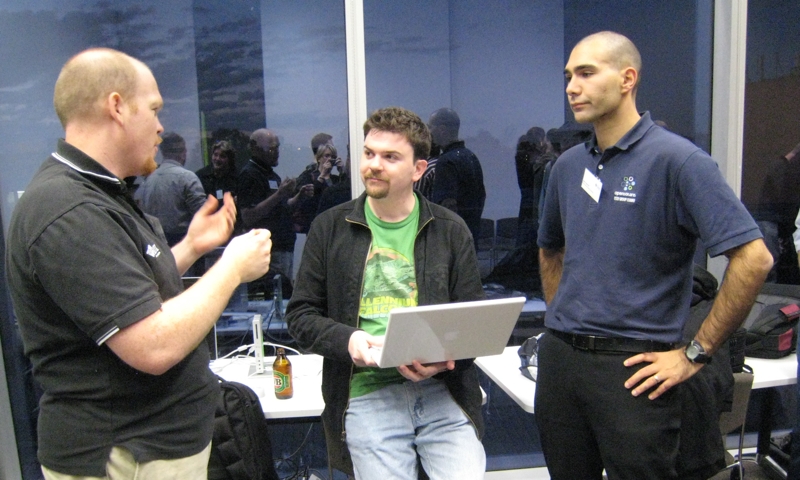
^ photo by thegreeno. This is me with two laptops in one lap, monitoring video, sound, and chat simultaneously. Not as calm as I look.

Executive Overview: What You Need to Stream Video with UStream

  • videocamera with FireWire output
  • laptop with FireWire input
  • FireWire cable with the appropriate plugs on each end (mini/4 pin for the videocamera, Windows laptops also seem to use this type, but there are several possibilities on Macs)
  • audio source with appropriate cable into laptop’s mic port – one option is to use the camera’s headset jack (if it has one)
  • hard-wired Internet access close to the laptop (wifi is probably not sufficient to support the video stream)
  • possibly a second laptop to monitor the stream and chats
  • earphones to monitor sound quality on the stream
  • tripod
  • videotapes
  • electrical power source close to all this, with plugs for the camera and the 1 or 2 laptops – bringing your own multiple power strip is a good idea
  • local electrical adapter(s)

The Story

We thought this conference would be taped using fancy dual video systems here at the Queensland Brain Institute. Which would have made my presence here somewhat redundant.

But QBI’s auditorium just got a big upgrade this week, and the new systems aren’t fully operational yet. We couldn’t get the telepresence camera aimed at the speakers, and in any case it’s not possible to stream to the open Internet from it (maybe it’s set up for within-campus streaming as well as capture).

So it was a good thing I and my gear came along.

The setup seemed straightforward when we visited the venue Monday afternoon. There’s a hole in the floor containing power and Ethernet in the third row of the audiotorium. I could set up the camera there, borrow a laptop with FireWire (when I packed for this trip, I knew I would regret not bringing the 17″ MacBook Pro I use for video editing, but I also knew I would regret having to carry it), we’d get an audio feed of the fancy new high-tech podium, all fine and dandy.

All wrong.

Wednesday morning we realized:

No way to get audio out from the podium mic to my system. The keynote would be two speakers (both of whom are pacers), and I only have one wireless lapel mic. Okay, I’ll use the shotgun mic and pick up room sound. Not ideal for camera sound, but better than nothing.

For the video stream, James brought his Dell laptop with FireWire, and I have two FireWire cables with me, including the right one for this laptop. But, when James came back from some last-minute errand at 8:45 am and unlocked his laptop for us, we realized that he runs Solaris and hadn’t yet installed Flash. Once we did install it, the laptop still couldn’t see the camera, and we didn’t have time to figure out why.

The quickest solution was to borrow a laptop from QBI. But I didn’t have the right FireWire cable for this older MacBook (why are there so damn many types?), nor a way to get audio into it. And the conference needed to start.

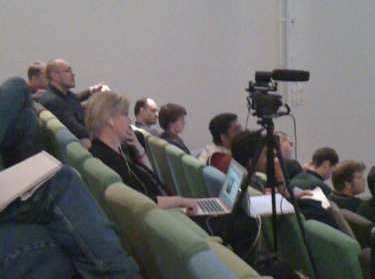
So we turned the MacBook around to face the audience and used its built-in webcam and mic to stream the first session. It wasn’t great, but it worked (audio was better if you were wearing headphones on the other end of the stream). Poor video quality made the slides illegible: I followed the UStream chat from my own laptop, and typed in the slide content. We had over 40 people on the video stream during the keynote (on ZFS), and they were grateful for whatever we could do to help them participate. I also relayed questions from the UStream chat to the speakers.

This is an auditorium with rows of seats, no table, desks, or arm-desks: we had the laptop precariously balanced on the back of a seat. Of course it fell, interrupting the stream, but fortunately suffered no damage. Can’t say the same for my foot when it fell a second time…

By the time we were ready to start the second presentation, the correct FireWire cable had been located, so we were able to use the camera to stream higher-quality video. Problem: for filming, I usually focus the camera on the speaker, knowing that I will edit in the slides later as graphic overlays. But the online audience needed to see the slides during the talk, and they weren’t yet available for download. So this video will be a lot more boring footage of slides than I usually shoot. I had too many things to manage to keep the camera moving between slides and speaker as much as I would have liked.

We also needed a way to get audio into the MacBook for the UStream feed which, annoyingly, doesn’t just take the audio off the FireWire from the camera. I used my wireless lapel mic on the remaining speakers, attaching the wireless receiver directly to the MacBook’s mic input. I can’t remember how sound got into the MacBook when the three-person panel was speaking. We must have somehow left the lapel mic lying in the right place to pick up good sound.

On the second morning James Lever, a local volunteer, brought in a sound board, but we didn’t have the right cables and adapters to put it all together with my wireless mics – it would take a good-sized trunk to carry around parts and cables for every possible contingency. We continued to use my wireless lapel mic on the speakers, but this time fed it into the camera via the Beachtek mixer, then used an audio cable with 3.5 mm connectors on each end to take audio from the camera’s headphone jack to the laptop. This means the camera is getting better sound, though it seems to cause a slight hum in the UStream audio.

Lessons:

Make slides available for download in advance. This is also a service to people in the room, because many of the slides were difficult even in the room, because they were too dense or used low-contrast text and background colors, and room lighting is not ideal.

Wireless mics have a thousand uses. Don’t leave home without them.

Social Media Meets Customer Service (Again)

There are lots of stories in the press these days about companies using Twitter for customer support, with more jumping on the bandwagon daily.

And I’m all for that. Good customer support is always good PR, but it’s even more effective when done in an open forum, where everyone – including other current and potential customers – can see it. I learned this over ten years ago when I haunted the Usenet CD-recording groups, helping people with Incat/Adaptec software.

Customers love Twitter support because (and as long as) it’s real-time, effective, intelligent, and doesn’t require them to hold on the phone.

Ad hoc support via social media can be all those things, but:

  • it’s only efficient as long as the number of employees available to provide it can manage the number of customers wanting it
  • it’s only effective if there’s a clear path for feedback from customers back to the company

You see, I’ve been down this road before. I provided support for customers of Incat’s (later Adaptec’s) CD-recording software via CompuServe, then on the Usenet, a moderated discussion list, email newsletters, and a website.

All of this worked well, up to a point. I knew CD-R technology inside out (because I literally wrote the book on it), so I could answer most questions myself. I had written the manuals, so I knew the software better than almost anybody. When we needed more hands on deck, I was given the budget to hire Adrian and Brian.